Home › Installation Guide
Before diving into your entertainment, ensure your official 4K LIVE IPTV subscription is active. Your account credentials are generated instantly upon order confirmation and sent directly to your registered email address.
Important: Please check your Spam / Junk folder if our setup email does not appear in your primary inbox within 5 to 10 minutes.
Select your preferred device from our supported options below—including Smart TV, Amazon Firestick, Android Box, iOS/Android, and PC/Mac. Simply click on your device icon to follow our simple step-by-step installation guide.
Once your IPTV app is configured, enter your 4KLIVEIPTV login details (Xtream Codes API or M3U URL).
Instantly enjoy thousands of premium channels, live sports, and VOD movies/series in crystal-clear 4K and Full HD with zero buffering.
Step 1: Enable Unknown Apps
Go to Fire TV Settings → My Fire TV → Developer Options → Install unknown apps. Toggle Downloader to ON. (If Developer Options is hidden, go to About and click your device name 7 times).
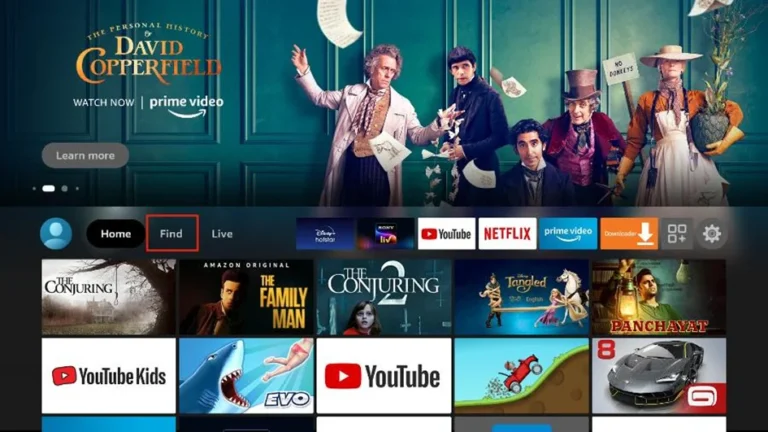
Step 2: Install the Downloader App
From the home screen, search for “Downloader” and click Install (free app by AFTVnews).
Step 3: Enter the Download Code
Open Downloader, enter the shortcode or URL provided in your 4K-IPTV activation email, and click Go.
Step 4: Install 4KLIVE IPTV
Downloader will automatically fetch the APK file. Click Install, then click Open when finished.
Step 5: Login & Start Streaming
Open 4KLIVEIPTV, enter your Username and Password (or M3U URL) from your activation email, and click Login to load your channels and VOD.
1. Download the Player Download our recommended IPTV player (e.g., IPTV Smarters Pro, VLC Player, or the 4k IPTV desktop app) from our website or official store.
2. Launch the Application Open the application on your computer and select Log in with Xtream Codes API or Load Your Playlist or File/URL.
3. Enter Your Credentials Fill in the login details sent to your email after purchasing 4kliveIPTV:
Any Name: IPTV
Username: Your username
Password: Your password
Server URL: The host URL provided in your activation email
4. Save & Load Content Click Add User or Login. The player will automatically load your live channels, EPG guide, movies, and TV series.
5. Start Streaming Select any live TV channel or VOD title to start watching in HD/4K resolution directly on your PC or Mac.
Tip: For the best performance on desktop, ensure hardware acceleration is enabled in your player settings and use an Ethernet cable or 5 GHz Wi-Fi connection.
1. Open the App Store From your Apple TV home screen, open the App Store.
2. Search for a Player App Click the search icon and search for an IPTV player like “IPTV Smarters Pro”, “iPlayTV”, or “GSE Smart IPTV” . Select the app from the results.
3. Install the App Click Get or Install to download the application onto your Apple TV.
4. Select Login Method Launch the app and select Log in with Xtream Codes API or Add Playlist.
5. Enter Your Credentials Fill in the login details sent to your email after subscribing to 4k IPTV:
Playlist Name: IPTV
Username: Your username
Password: Your password
Server URL: Your portal URL
6. Sync & Start Streaming Click Add User or Save. Wait a few moments for your live TV channels, movies, and series to synchronize, then start watching.
Tip: If streams don’t load immediately, go into the app settings and change the Video Player engine to Native or switch the stream format from M3U8 to TS.
Works on Android 5.0 and newer (including Google TV, Android TV Box, Nvidia Shield, phones, and tablets).
1. Open Google Play Store On your Android device, open the Google Play Store. (For TV boxes without Play Store, use the Downloader app or Chrome browser to download the APK directly).
2. Search & Install the App Search for “4K IPTV” (or an IPTV player like “IPTV Smarters Pro” or “XCIPTV Player”). Click Install.
3. Launch the Application Open the app from your home screen or app drawer and select Log in with Xtream Codes API.
4. Enter Your Activation Details Fill in the login credentials sent to your email after subscribing to 4K LIVE IPTV:
Name: IPTV
Username: Your username
Password: Your password
Server URL: The host/portal URL from your email
5. Login & Enjoy Click Add User or Login. Allow a few seconds for the live channels, VOD library, and EPG guide to sync, and start streaming.
Tip: If installing via a direct APK file on an Android Box or Smart TV, go to Settings → Security & Privacy and enable “Install Unknown Apps” for your file manager or browser.
1. Open Google Play Store From your Android TV home screen, navigate to Apps or open the Google Play Store.
2. Search & Install the App Click the search icon and type “4K IPTV” (or an IPTV player like “IPTV Smarters Pro” or “XCIPTV”). Select the app and click Install.
(Alternative Method): If installing via APK code, install the Downloader app from the Play Store, type the code provided in your activation email, and click Go.
3. Launch the Application Open the app from your TV home screen and select Log in with Xtream Codes API.
4. Enter Your Login Credentials Fill in the details sent to your email after subscribing to 4KLIVE IPTV:
Name: IPTV
Username: Your username
Password: Your password
Server URL: The host/portal URL from your email
5. Login & Start Streaming Click Add User or Login. Wait a few seconds for your live channels, EPG guide, and VOD library to sync, then start watching.
Tip: On Android TV / Google TV devices, make sure to grant storage and network permissions to the app when prompted for optimal performance.
4kliveIPTV is a premium streaming service providing high-definition (HD & 4K) live TV channels, live sports, PPV events, and a vast on-demand library of movies and TV series directly to your smart devices.
Yes, we offer a 24-hour trial so you can test our server speed, channel stability, and 4K video quality before committing to a paid plan.
4kliveIPTV supports all major devices, including Smart TVs (Samsung, LG, Android TV), Amazon Firestick, iOS, Android phones/tablets, MAG boxes, Formuler, Apple TV, and PC/Mac.
We recommend a minimum download speed of 15 Mbps for smooth HD streaming and 30+ Mbps for uninterrupted 4K Ultra HD and live sports events.
Yes, 4kliveIPTV includes an interactive Electronic Program Guide (EPG) that displays real-time TV schedules and upcoming event listings across your channels.
Subscribing is quick and easy! Simply go to our Pricing Plans section, choose the 4klive iptv package that fits your needs (1, 3, 6, or 12 months), and click "Buy Now". After a secure checkout, you will receive your activation details via email within 5 to 10 minutes.
We stand behind the quality of our service. We offer a 7-Day Money-Back Guarantee if you experience any technical issues with your 4KLIVEIPTV connection that our support team cannot resolve. We always recommend trying our 24-hour free trial first.
Our dedicated customer support team is available 24/7 to help you with any setup questions or technical assistance regarding 4k-live-IPTV. You can contact us instantly via WhatsApp or by opening a ticket through our website's support system.